
Buen Camino de Santiago App
Buen Camino SLTravel & Local
4.6154.00 Reviews
- Version
- 4.5.3
- Installs
- 500.00K
- Age Rating
- Everyone
Screenshots
Our Review of Buen Camino de Santiago App
 Analysis by Appyee
I see Buen Camino as a Camino-focused planning companion rather than a general travel app. That distinction matters: if you’re walking a route to Santiago, having route information and practical planning in one place can be more useful than juggling a broad map app, saved web pages, and notes. I’d consider it before setting off, but I would still make decisions with my own judgment rather than treating any phone as a substitute for preparation.
What makes a Camino-specific guide useful
The Camino is not simply a sequence of walking directions. A day’s plan also depends on where you might stop, how far you want to walk, and what you hope to see along the way. A dedicated guide can help put those questions in context. Buen Camino is made by Buen Camino SL, and its focus on the main routes gives it a clear purpose for pilgrims instead of trying to serve every kind of trip.
That focus is also the main reason I would choose it over relying only on a conventional navigation app. A general map can be excellent for getting around a city or checking a road, but it may not organize a pilgrimage around the stages, towns, and decisions walkers face. Conversely, a guidebook gives you useful background but is less convenient when you want to check a route while moving. I like the idea of using this app as the Camino-specific layer, while keeping another navigation option available for ordinary travel or a second opinion.
Planning a day without overplanning it
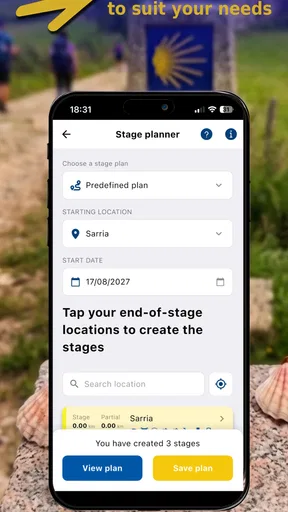
A practical way to use a route guide is to plan a likely stopping point the evening before, then leave room to change course. For example, if I were beginning a morning walk with a fixed destination in mind, I’d check the towns and distances along the route before setting out, identify a sensible place to pause, and keep an alternative in mind if my pace or energy changed. That is more useful than planning every hour in advance: the information supports a flexible day rather than turning the walk into a schedule to obey.
Distance information can help make that plan realistic, but distance alone does not tell you how a stage will feel. I’d treat it as a starting point and factor in my own fitness, weather, stops, and the load I’m carrying. A stage that looks comfortable on a screen may feel different after several hours on foot. The strongest use of a walking app is helping you notice choices early, not promising that a particular day will be easy.
Before relying on any app for a day’s route, I’d also check how its map behaves on my own device and make sure I understand what I can access without a connection. The service is free to install, but it offers in-app purchases, so I would review any paid option on screen before buying and decide whether it solves a real need for my trip. That small bit of preparation is better than discovering a limitation when you are already far from a reliable signal.
Who will get the most from it
I’d recommend Buen Camino most to someone preparing for a first Camino, or to a returning walker who wants route-focused information close at hand. It can also suit a traveler who prefers to look ahead at possible stages instead of improvising every stop. Its broad audience is reflected in its Everyone age rating, and its 4.8 average from around 15,000 ratings suggests that many users value what it offers. It has passed 500,000 installs, which makes it a well-established option in this specialized travel niche.
It is less compelling if you want a general-purpose travel planner for several kinds of holidays, or if you prefer to carry a paper guide and keep your phone packed away while walking. A printed map or guide can be easier to consult without worrying about battery life, and a general mapping app may be better for navigating unrelated city trips. I’d also avoid assuming that a digital route replaces local signs, current judgment, or asking someone nearby when a junction is unclear. On a long walk, having more than one way to orient yourself is sensible, not excessive.
Your Trusty Digital Companion
First off, let me just say, the app is incredibly user-friendly. Even if you're not the most tech-savvy person out there, navigating through the app feels as intuitive as taking your next step on the trail. From the moment you fire it up, it welcomes you with a clean, uncluttered interface that doesn’t distract from the main event: your journey.
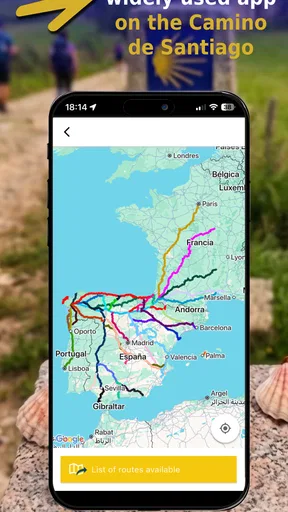
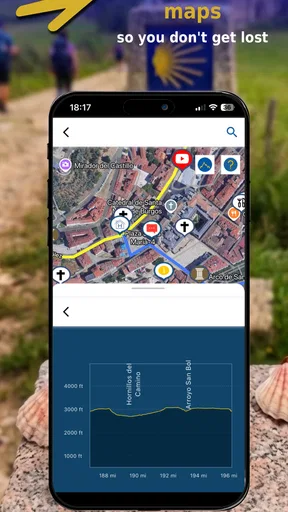
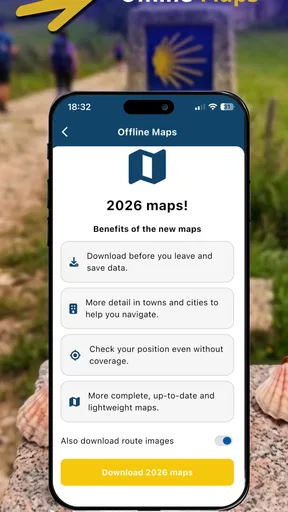
The app is packed with detailed maps of various Camino routes. Whether you're planning to trek the popular Camino Francés or the more remote Camino Primitivo, this app has you covered. The maps are detailed, and you can zoom in to see every little trail and town you'll be passing through. Plus, the offline functionality is a lifesaver. No more worrying about losing signal in the middle of a remote forest or quaint village.
Features That Keep You Going
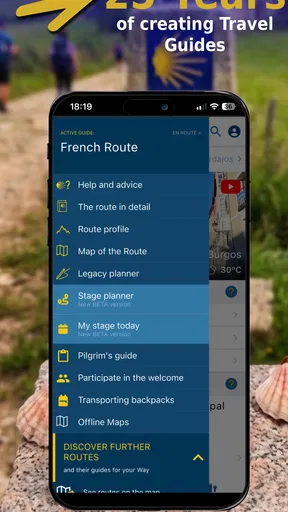
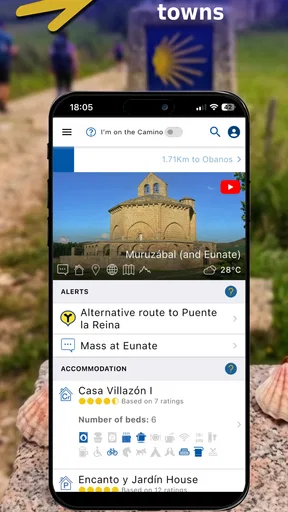
One of the standout features is the accommodation guide. As any seasoned pilgrim will tell you, knowing where you can rest your weary feet is crucial. The app provides a comprehensive list of albergues, hotels, and hostels along the way. You can check availability, prices, and even book directly through the app, which is a huge plus.
Another nifty feature is the distance calculator. It helps you plan your daily walks by showing distances between towns and landmarks. This way, you can tailor your journey to your personal pace, ensuring you're not overexerting yourself or missing out on must-see sites.
But wait, there’s more! The app also has a built-in weather forecast. Knowing what to expect weather-wise can be a game changer. It allows you to pack appropriately and plan your walking schedule around potential rain or heat waves.
Stay Connected with Fellow Pilgrims
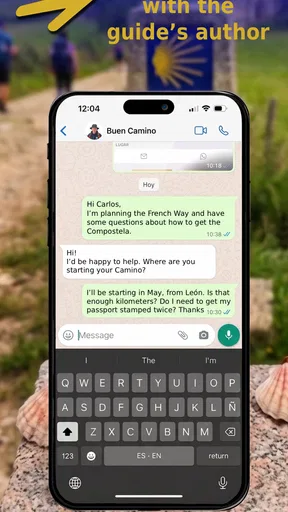
Community is such a big part of the Camino experience, and the app taps into that beautifully with its social features. You can connect with other pilgrims, share tips, or even arrange to meet up along the way. It’s like a modern-day message board, keeping the spirit of camaraderie alive and well.
The app also includes a diary feature, letting you document your journey as you go. This is a fantastic way to keep track of your experiences and memories. You can jot down thoughts, add photos, and even share your entries with friends or family back home.
A Personal Touch
Now, what really sets the Buen Camino de Santiago App apart is its attention to detail. The developers clearly have a deep love for the Camino, and it shows. There are little nuggets of wisdom and motivational quotes sprinkled throughout the app, offering encouragement just when you need it most.
Additionally, the app offers insights into the history and culture of the Camino. It’s like having a virtual tour guide who whispers tales of ancient pilgrims and local legends as you walk.
Using it thoughtfully on the trail
I would make the app part of a simple routine rather than checking it constantly. Before leaving in the morning, I’d look over the next stretch and note a couple of places where I could pause or adjust the day. At a break, I’d check how the plan feels against my actual pace, then make a fresh choice. That keeps the phone useful without letting it dominate a walk that is often best experienced by looking up and paying attention to the landscape.
There is a useful trade-off here: route and lodging details can make decisions less stressful, but having lots of information can tempt you to optimize every stop. I’d resist that. A list of places to stay is most valuable as a set of options, not a guarantee that a bed will suit your needs at the exact moment you arrive. If a particular accommodation matters to your plan, check its current details rather than assuming an app entry settles the question.
For a first-time pilgrim, I’d use the planning tools to learn the shape of the route, then keep the daily target conservative enough to allow for breaks and surprises. Someone walking with companions should compare expectations before the day starts: the person who wants a long stage and the person who prefers a gentler pace may read the same distance very differently. The app can help make that conversation concrete, but it cannot decide what feels right for everyone in the group.
Practical limits to keep in mind
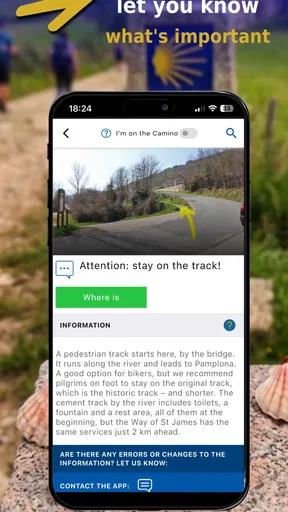
Even a well-focused guide has limits. An app depends on a charged phone, and offline access does not remove the need to prepare: I’d check maps and essential information before leaving a place with a dependable connection, and carry a charging plan that suits the length of my day. I would not assume that every detail remains current just because it appears in a digital guide. Accommodation availability, local conditions, and route choices can change, so use the app to narrow down options and confirm important details when possible.
The social side can be appealing, but I would treat it as an optional extra rather than the reason to install the app. Some walkers want to share tips and make plans; others value a quieter trip and prefer to meet people naturally along the way. Neither approach is wrong. If you do share diary entries or photos, think about what you want others to see and keep private notes private. That’s a sensible habit for any social travel tool, especially when a journal may include personal reflections.
Another point worth considering is the cost model. The app is free, while optional in-app purchases range from $0.99 to $109.99 per item. That is a wide spread, so I’d check exactly what an item includes and whether I need it before purchasing. A free download makes it easy to try the basic experience, but it does not mean every function or extra is necessarily included at no cost.
How I’d choose between it and other guides
If I were choosing between Buen Camino, a paper guide, and a general map, I would not expect one to replace all the others in every situation. The app’s advantage is having Camino-oriented planning in a portable format; paper is dependable when I want a screen-free reference, while a broad navigation app is more flexible for errands, transport, or exploring beyond the pilgrimage route. For a walker who likes digital planning, the dedicated guide is the natural starting point. For someone who values independence from a phone, paper may be the better primary tool, with an app as backup.
Version 4.4.4 is the current version, and the app has been available since April 8, 2014. Those details make it a mature product rather than a newly launched experiment, but I would still check that it works smoothly on my device before depending on it for a trip. It requires Android 7.0 or later. If I were using an iPhone, I’d check the relevant store page for device compatibility before planning around it, rather than assuming Android requirements apply to iOS.
A Personal Touch
Now, what really sets the Buen Camino de Santiago App apart is its attention to detail. The developers clearly have a deep love for the Camino, and it shows. There are little nuggets of wisdom and motivational quotes sprinkled throughout the app, offering encouragement just when you need it most.
Additionally, the app offers insights into the history and culture of the Camino. It’s like having a virtual tour guide who whispers tales of ancient pilgrims and local legends as you walk.
Final Thoughts
In conclusion, if you're planning a pilgrimage on the Camino de Santiago, downloading the Buen Camino de Santiago App is a no-brainer. It’s more than just a navigation tool; it’s a comprehensive guide that enhances your journey, making sure you have all the information you need at your fingertips. So lace up those boots, grab your backpack, and let this app be your trusty guide on this unforgettable adventure.
Buen Camino!
Verdict
Strengths of Buen Camino de Santiago App
- Comprehensive trail maps available offline.
- Detailed information on accommodations.
- Real-time weather updates for planning.
- In-app journal to log daily experiences.
- Community feature for connecting with pilgrims.
Limitations of Buen Camino de Santiago App
- Limited language support options.
- Some features require premium upgrade.
- Occasional GPS inaccuracies reported.
- Heavy battery usage on long hikes.
- Limited customization for notifications.
Similar Picks in This Category
View All
Google Maps
Google LLC3.4

Google Maps Go
Google LLC4.1

Booking.com: Hotels & Travel
Booking.com Hotels & Vacation Rentals4.8

Google Earth
Google LLC3.8

Skyscanner Flights Hotels Cars
Skyscanner Ltd4.8

trivago: Compare hotel prices
trivago N.V.4.4
Frequently Asked Questions
What features does the Buen Camino de Santiago app offer?
The Buen Camino de Santiago app provides a comprehensive guide for pilgrims walking the Camino de Santiago. It includes detailed maps, route options, accommodation listings, and points of interest. Additionally, it offers offline access, allowing users to navigate without an internet connection. The app also includes a social feature to connect with fellow travelers.
Is the Buen Camino de Santiago app available offline?
Yes, one of the standout features of the Buen Camino de Santiago app is its offline capability. Users can download maps and essential route information before starting their journey, ensuring they have access to important data even in areas with no internet coverage. This is particularly useful for remote sections of the trail.
How does the app assist with accommodation bookings?
The app provides a comprehensive list of accommodations along the Camino de Santiago routes, including hostels, hotels, and albergues. Users can view details such as pricing, availability, and contact information. While the app doesn’t directly handle bookings, it offers links or contact details to make reservations easy.
Can I track my progress with the Buen Camino de Santiago app?
Yes, the app includes a built-in GPS tracker that helps users monitor their progress along the route. It shows distance covered, remaining distance, and estimated time to destination. This feature is invaluable for planning daily stages and ensuring you stay on the right path throughout your pilgrimage.
Does the app support multiple Camino routes?
Absolutely, the Buen Camino de Santiago app supports various routes, including the popular Camino Francés, Camino Portugués, and several others. Users can select their preferred route and receive tailored information and guidance specific to that path. This flexibility makes it useful for first-time pilgrims and seasoned Camino veterans alike.
